
The update in the video
Update contents at a glance
What's in the January update
This release is aimed at anyone who uses Calenso professionally and internationally: more flexibility in workflows, better management of appointments, optimized payment processes, and a future-proof technological basis.
Special focus:
- International expansion (AUD & NZD)
- Automation and tracking
- Performance and stability
- Improved user experience in the dashboard and widget
This release brings a comprehensive update with Angular 20 for all front ends, new currency support for Australia and New Zealand, and numerous improvements for workflows, calendars, and booking processes. A total of over 170 changes have been implemented in this release.
New functions
1. New currencies and regions: AUD & NZD
First, the Calenso January update focuses on new features that simplify everyday work and further improve existing processes.
- Australian dollar (AUD)
- New Zealand dollar (NZD)
In addition, the regional date and address formats have been integrated. This makes Calenso optimally prepared for customers in Australia and New Zealand. This represents another step toward international scaling.
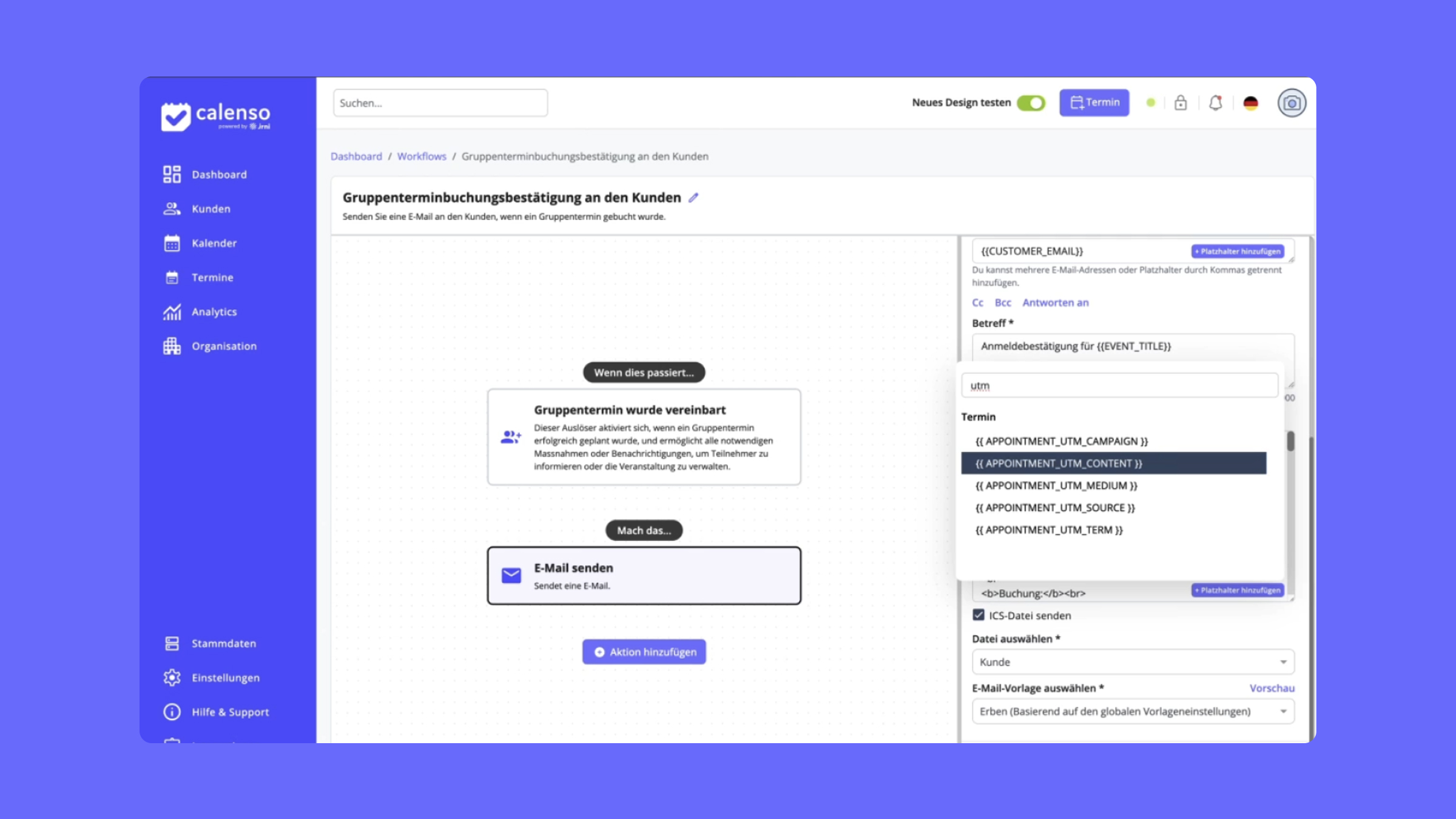
2. Advanced workflow placeholders
- CUSTOMER_ID – unique customer ID
- SERVICE_IDS – all booked service IDs
- ORIGINAL_RESOURCE_XXX – original resource for transfer postings
- CUSTOMER_TITLE – Title such as Mr./Ms.
- APPOINTMENT_ID – unique appointment ID
- UTM parameters – complete transfer of all UTM values for marketing tracking
Ideal for data-driven communication, reporting, and automation.
3. No-show/show function for appointments
Administrators can now mark appointments as "attended" or "did not attend" directly via a link. This feature is accessible via special URLs on the appointment landing page and enables quick documentation of attendance—ideal for tracking and analysis.
4. Waiting list triggers in workflows
New triggers now support the management of waiting list registrations. Automatic notifications can be sent when customers add themselves to a waiting list or when a spot becomes available.
5. Service block feature
Service blocks can now be configured in the dashboard to block specific periods for individual services. This allows you to set seasonal restrictions or maintenance times for specific services, for example.
6. Microsoft Teams meeting options
New settings for Microsoft Teams meetings give you more control over meeting configuration directly in the dashboard. Customize the Teams integration to suit your needs.
7. Customer profile deep links
Customer profile deep links can now be used in the widget to automatically pre-fill broker data. This significantly speeds up the booking process for returning customers.
Improvements & optimizations
Dashboard
- Past availabilities: Can now be collapsed/expanded for a better overview in the calendar
- Role sorting: Roles can be sorted by partner or role name.
- Stripe invoices: New status filters and pagination for improved clarity
- Bryntum calendar: Dependent booking queries are now displayed correctly
- Conversion tracking: Conversion rates are now displayed as percentages in the Analytics dashboard.
- Quick filter: New quick filter function for customer searches in the calendar
- API key management: Improved overview and management of API keys
- Security: Google API keys are now displayed in a concealed manner
Widget & Smart Widget
- Zip code search: Improved automatic city filling based on the zip code
- Stripe integration: Optimized Stripe payment element for smooth payments
- 12/24-hour format: Now adjustable at widget level
- Survey UX: Improved user guidance for surveys with clearly labeled buttons
workflows
- Combi-Service list: For booked Combi-Services, the complete list is displayed in the partner email.
- Skip email: New setting for skipping emails within the lead time
- White label preview: Email preview now supports white label settings
bug fixes
- External calendar sync: Synchronization now works correctly when editing appointments.
- Workflow template: Correct template is loaded, even when logged in as a support user
- Group appointments: Location address is automatically taken from the selected store
- Azure Sync: Fixing the issue with skipped employees in the sync list
Technical upgrades
- Angular 20 upgrade: Dashboard, widget, and smart widget have been updated to Angular 20 for better performance and state-of-the-art web standards.
- iFrame Resizer 5.5.7: Upgrade for improved widget integration on your website
- Zapier integration: Official release of the Zapier app for seamless automation with over 5,000 apps
Conclusion & outlook
Whether it's international expansion with new currencies, optimized workflows, or technical modernization with Angular 20, the Calenso January update makes Calenso more powerful, more flexible, and ready for international use.
Would you like to experience the new features from the Calenso January update live, or do you have specific questions about your own use cases? Our experts will be happy to show you Calenso in a personal consultation and address your specific requirements. Book an appointment now and discover how you can make your online appointment booking even more efficient.